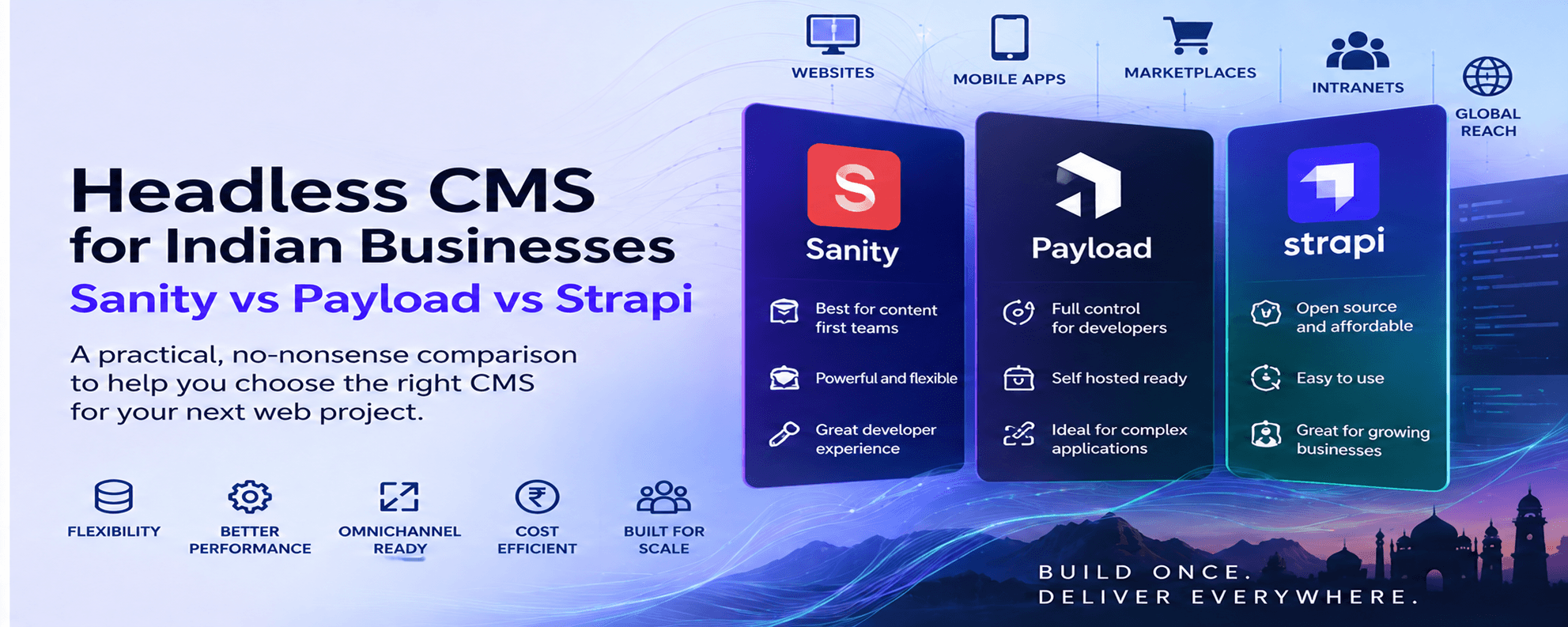
If you ask three developers which headless CMS you should use, there is a good chance you will get four answers.
That is not because the tools are bad.
It is because the decision is rarely about a feature checklist.
It is about the type of website you are building, the team that will run it, how much infrastructure you want to own, how tightly the CMS must integrate with your application, how many editors will use it, how much governance you need, and what you expect the platform to become over the next three to five years.
For Indian businesses, a few additional questions matter:
- Do you need the option to host the application and database in an India region?
- Is your development team stronger in Next.js, general Node.js, or content operations?
- Do you want a managed content platform or direct ownership of the database and deployment?
- Will content be used only on one website, or across apps, portals, dealer systems, microsites, and AI experiences?
- How important are editorial preview, workflows, permissions, localization, and auditability?
- Are you buying a CMS, or are you really building a digital product with a CMS inside it?
At MagicWorks, our AI-native website architecture names Sanity, Payload, and Strapi as the three headless CMS options we consider depending on project requirements.
This article explains how I would choose among them in September 2026.
It is not a sponsored ranking. There is no universal winner.
The useful answer is best fit by operating model.
The short answer
If you need a quick decision before reading the full comparison:
- Choose Sanity when editorial experience, structured content, real-time collaboration, visual editing, and a managed content backend are more important than owning the content database infrastructure yourself.
- Choose Payload when your product is already centered on Next.js and your development team wants one TypeScript codebase, direct database ownership, deep application logic, authentication, access control, and self-hosting flexibility.
- Choose Strapi when you want a conventional open-source headless CMS with a separate Node.js backend, REST/GraphQL APIs, self-hosting control, a broad content-management model, and a familiar separation between CMS and frontend.
For many B2B marketing websites, Sanity is the easiest editorial choice.
For custom portals and application-heavy Next.js builds, Payload is often the most natural engineering choice.
For organizations that want an open-source CMS backend they can operate independently from the frontend, Strapi is often the balanced choice.
But those are defaults, not rules.
First, what does "headless CMS" actually mean?
A traditional CMS usually combines two jobs:
- storing and managing content;
- rendering the website visitors see.
A headless CMS separates those jobs.
The CMS becomes the content system. The website or application is built separately and requests content through APIs or queries.
That means the same content can potentially power:
- a website;
- mobile app;
- customer portal;
- dealer portal;
- internal dashboard;
- digital signage;
- campaign microsite;
- product catalog;
- AI assistant;
- search index;
- voice or conversational interface.
The advantage is flexibility.
The trade-off is that you now own more architecture decisions.
A headless CMS is not automatically simpler than WordPress. It is usually more composable.
Why MagicWorks uses a headless CMS in AI-native builds
MagicWorks' current AI-native web-development service uses a Next.js front end, an LLM-backed backend, and a headless CMS, with Sanity, Payload, or Strapi selected per project.
There are three reasons this matters in an AI-native architecture.
1. Content is easier to structure
AI systems work better with clean, reusable content units than with long page-builder blobs.
A service can have structured fields for:
- title;
- summary;
- industries;
- problem statements;
- eligibility;
- FAQs;
- evidence;
- related case studies;
- pricing notes;
- CTA;
- geographic relevance;
- last reviewed date.
That structure helps normal publishing and also makes retrieval, search, personalization, and content reuse more reliable.
2. The frontend is independent
The website can evolve without replacing the content system, and the content system can serve more than one interface.
3. AI becomes another consumer of approved content
A grounded assistant, semantic search layer, recommendation engine, or internal agent can retrieve from the same governed content source rather than relying on uncontrolled copy-and-paste documents.
That does not make every headless CMS equally suitable.
The differences become important once the website moves beyond a simple blog.
Sanity vs Payload vs Strapi: the high-level comparison
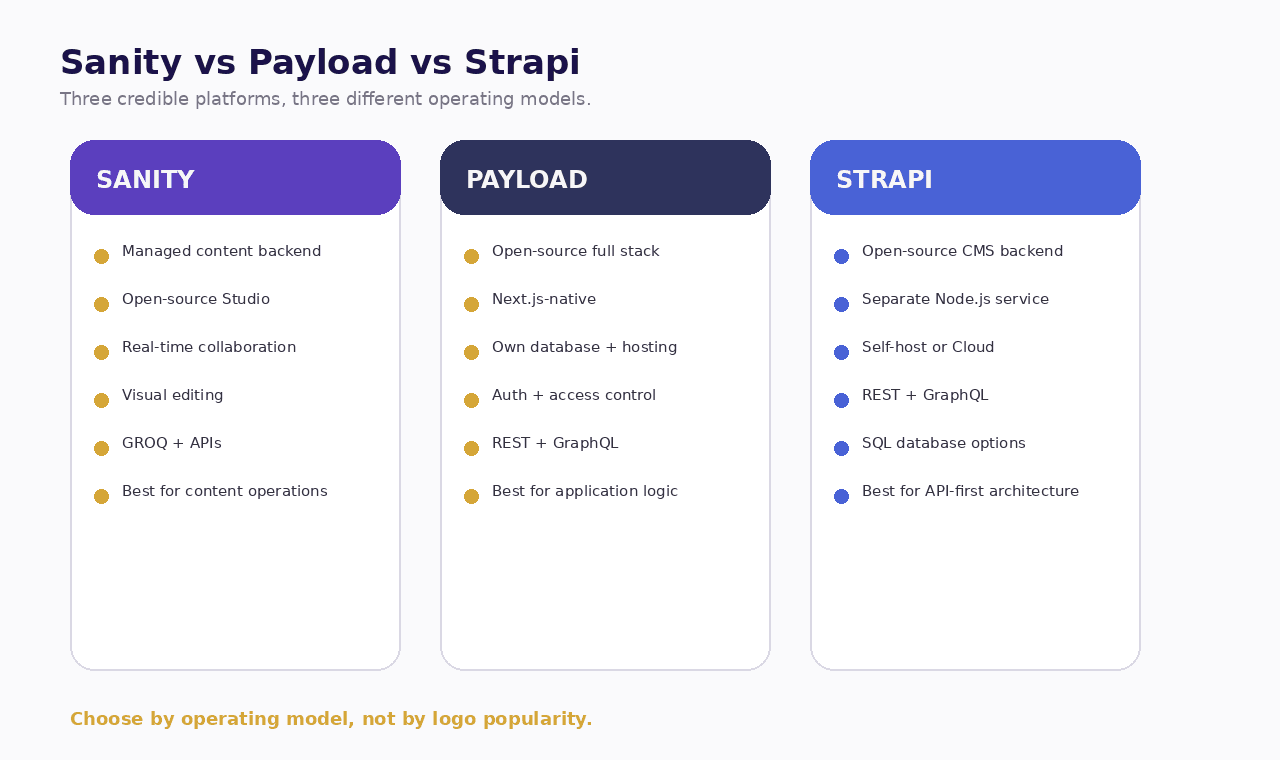
| Metric | Sanity | Payload |
|---|---|---|
| Core model | Managed content platform + open-source Studio | Open-source Next.js full-stack framework/CMS |
| Data layer | Sanity hosted Content Lake | Your MongoDB, Postgres, or SQLite |
| Frontend fit | Framework-agnostic, strong Next.js support | Native Next.js integration |
| Editorial UX | Excellent, highly customizable | Strong, code-driven |
| Real-time collaboration | Native strength | Available capabilities, depends on setup |
| Visual editing | Strong built-in tooling | Available, with enterprise capabilities for advanced needs |
| APIs/query | GROQ, GraphQL, APIs | REST, GraphQL, Local API, direct DB patterns |
| Self-host backend | Studio can self-host, Content Lake remains hosted by Sanity | Yes |
| Database ownership | No direct hosting of Content Lake | Yes |
| Best fit | Content-led websites and omnichannel publishing | Next.js products, portals, custom apps |
| Metric | Sanity | Strapi |
|---|---|---|
| Core model | Managed content platform + open-source Studio | Open-source Node.js headless CMS |
| Data layer | Sanity hosted Content Lake | Your SQL database when self-hosted, or managed Postgres on Strapi Cloud |
| Frontend fit | Framework-agnostic, strong Next.js support | Framework-agnostic, common with Next.js |
| Editorial UX | Excellent, highly customizable | Strong, familiar CMS-style admin |
| Real-time collaboration | Native strength | More conventional publishing workflow |
| Visual editing | Strong built-in tooling | Live Preview available |
| APIs/query | GROQ, GraphQL, APIs | REST, GraphQL |
| Self-host backend | Studio can self-host, Content Lake remains hosted by Sanity | Yes |
| Database ownership | No direct hosting of Content Lake | Yes when self-hosted |
| Best fit | Content-led websites and omnichannel publishing | API-first websites and enterprise content backends |
This table is a starting point. Procurement decisions should go deeper.
Sanity: best when content operations are the center of gravity
Sanity is unusual because it is not simply an installable CMS with a database you run.
Sanity Studio is an open-source React-based editing application. You can host that Studio yourself or let Sanity host it. But the Studio connects to Sanity's hosted APIs and Content Lake. Sanity's own documentation is explicit that content is stored in the hosted Content Lake even when the Studio runs locally or is self-hosted.
That operating model is important.
What Sanity does particularly well
Structured content
Sanity treats content as structured data rather than pages.
That mindset is excellent for businesses planning:
- multiple sites;
- multilingual content;
- reusable product or service data;
- content personalization;
- omnichannel publishing;
- AI retrieval;
- editorial reuse across markets.
Editorial customization
Sanity Studio is built in React and generated from code-defined schemas. Developers can shape the editor around the business rather than forcing editors into a fixed interface.
Real-time collaboration
Sanity's Content Lake supports real-time updates, and collaborative editing is a core part of the platform.
For teams where multiple marketers, editors, designers, and reviewers work in the same content environment, this is a meaningful advantage.
Visual editing and live preview
Sanity's Visual Editing tools allow editors to preview content and click into elements from the rendered site. Current documentation supports live updates and a Presentation Tool for visual workflows.
This matters because one of the traditional complaints about headless CMS platforms is that editors lose the page-like preview experience they had in WordPress.
Sanity has invested heavily in reducing that gap.
GROQ
Sanity's main query language, GROQ, is highly expressive. It can filter, join references, project exactly the fields needed, and reshape the response at query time.
Developers who learn GROQ often appreciate its power.
The trade-off is that it is another query language to learn.
Where Sanity can be the wrong choice
Sanity is less attractive when the organization has a hard requirement to own and operate the content database itself.
You can self-host Studio, but that is not the same as self-hosting the Content Lake.
It may also be a weaker fit when the CMS is tightly embedded in a custom transactional application where the same application code needs direct control over authentication, database transactions, and domain logic.
Sanity can integrate with such systems, but at that point the CMS is one service among several rather than the center of the application.
Sanity pricing in September 2026
Sanity's current public pricing shows:
- Free: $0, up to 20 user seats, two public datasets, hosted real-time content database, live previews and visual editing;
- Growth: $15 per seat per month, up to 50 seats, private or public datasets, additional collaboration capabilities and usage-based scaling;
- Enterprise: custom pricing with advanced governance, SAML SSO, dedicated support, custom quotas, and other enterprise capabilities.
Pricing and quotas change. Re-check the official page before budgeting.
Sanity is a strong fit for
- content-heavy B2B websites;
- editorial teams with several contributors;
- multi-brand or multi-market publishing;
- structured resource libraries;
- websites where content reuse matters;
- teams that value visual editing and collaboration;
- organizations comfortable with a managed content backend.
Payload: best when the CMS is part of the application
Payload has changed considerably over the last few years.
Its current positioning is not merely "headless CMS." Payload calls itself an open-source Next.js backend and full-stack framework.
That description is accurate in practical terms.
Payload can provide:
- admin panel;
- database schema and migrations;
- REST and GraphQL APIs;
- authentication;
- access control;
- file uploads;
- live preview;
- custom application logic;
- CMS features;
- direct integration with a Next.js application.
Payload installs directly into a Next.js app and currently supports MongoDB, Postgres, and SQLite through database adapters.
What Payload does particularly well
One TypeScript ecosystem
For a team already building in Next.js and TypeScript, Payload reduces conceptual distance between "the CMS" and "the application."
The CMS is not a remote content SaaS that you only query over HTTP. It can live inside the same application architecture.
That is attractive for:
- portals;
- authenticated experiences;
- marketplaces;
- member sites;
- content-plus-application products;
- internal tools;
- custom dashboards;
- sites with complex permissions.
Database ownership
Payload is open source and MIT licensed. Its current documentation says you can self-host it anywhere you can run the application.
For Indian businesses that want to deploy the app and database in an India region under their own cloud account, this can be a major advantage.
The organization controls:
- database provider;
- region;
- backups;
- network setup;
- storage;
- runtime;
- observability;
- upgrade timing.
That control is valuable, but it creates responsibility.
Deep application logic
Because Payload is code-first and sits close to the application, developers can build custom hooks, access-control rules, workflows, integrations, and business logic without treating the CMS as a separate black box.
Next.js-native architecture
Payload's current installation model puts Payload directly into the Next.js app folder and ships official integration packages for Next.js.
For a Next.js-focused agency or product team, this is one of Payload's clearest differentiators.
Where Payload can be the wrong choice
Payload is not the obvious choice for a marketing team that wants a content platform with minimal infrastructure involvement and little developer ownership.
Someone still needs to run the application stack.
The official deployment guidance reminds teams that a production Payload setup may also need database hosting, persistent file storage, email, CDN, and other operational services depending on the project.
If you self-host because "open source is cheaper" but then under-budget DevOps, backups, patching, security, monitoring, and upgrades, the economics can reverse quickly.
Payload can also be more engineering-centric than a traditional marketing team expects.
That is not a criticism. It is part of the product's strength.
Payload pricing in September 2026
Payload's self-hosted open-source core is currently free under the MIT license. Its public get-started page emphasizes self-hosting and also offers enterprise support and advanced enterprise capabilities through sales-led plans.
In other words, your baseline software-license cost can be zero, but your total cost is not zero.
Budget for:
- hosting;
- database;
- storage;
- backups;
- monitoring;
- engineering maintenance;
- security patching;
- enterprise support if required.
Payload is a strong fit for
- Next.js-heavy engineering teams;
- portals and member sites;
- web applications with substantial custom logic;
- businesses needing direct database and hosting control;
- products where authentication and access control are central;
- teams that want a CMS and application backend in one codebase;
- agencies that expect to customize extensively.
Strapi: best when you want a classic open-source headless CMS operating model
Strapi is the easiest of the three to explain to someone who already understands traditional backend architecture.
It is an open-source Node.js headless CMS that generates REST and GraphQL APIs, provides an admin interface for content teams, and can be self-hosted or deployed to Strapi Cloud.
Strapi 5 continues to position itself as an extensible content framework rather than a closed SaaS.
What Strapi does particularly well
Clear separation of concerns
A common Strapi architecture looks like this:
Next.js frontend -> Strapi API -> database
That separation is familiar and easy to reason about.
The frontend and CMS can be deployed, scaled, and maintained independently.
Open-source self-hosting
Strapi's Community edition is MIT licensed and can be run on your own infrastructure. Strapi explicitly supports self-hosting on your cloud, servers, containers, or other Node.js infrastructure.
For teams with infrastructure policies, this provides control over where the CMS and database run.
Database flexibility within SQL choices
Strapi's current self-hosting guidance lists PostgreSQL, MySQL, and MariaDB for production, with SQLite commonly used in local development.
This makes Strapi a comfortable choice for organizations already standardized on relational databases.
CMS-first administration
Strapi's Content-Type Builder, Content Manager, media library, roles, and familiar admin patterns can feel more conventional to editors than a highly code-shaped system.
REST and GraphQL
Strapi can generate APIs quickly from the content model. This is one of its long-standing strengths.
Where Strapi can be the wrong choice
Strapi can introduce more moving parts than Payload for a pure Next.js project because the CMS is usually a separate application rather than part of the same Next.js runtime.
That is sometimes an advantage and sometimes unnecessary overhead.
It can also require careful review of which collaboration, governance, history, SSO, and workflow features are included in the open-source edition versus paid CMS plans.
Strapi's own 2026 support documentation notes that Strapi Cloud hosting fees and paid CMS feature licensing are separate. A paid Cloud plan does not automatically include every paid CMS capability.
That distinction matters during procurement.
Strapi Cloud pricing in September 2026
Strapi's current public Cloud pricing lists:
- Starter: $35 per project per month;
- Pro: $90 per project per month;
- Business: $450 per project per month.
The plans differ in API requests, storage, bandwidth, backups, environments, observability, runtime behavior, and SLA. Paid CMS features can require separate licensing.
Again, verify before purchase because SaaS pricing changes.
Strapi is a strong fit for
- organizations that want open-source CMS control;
- API-first website architectures;
- teams comfortable operating a separate Node.js backend;
- businesses standardized on PostgreSQL/MySQL/MariaDB;
- projects that may serve multiple frontends;
- organizations that want to choose between self-hosting and a managed Strapi deployment.
Which one gives Indian businesses the most control over hosting?
If "control" means you want to choose your own cloud, region, database, storage, network, and backup strategy, Payload and self-hosted Strapi offer the most direct control.
Sanity lets you self-host the Studio interface, but the Content Lake remains a Sanity-hosted service.
That does not automatically make Sanity less secure or less suitable.
It means the procurement model is different.
Ask these questions instead of simply asking "Can it be hosted in India?"
- Which data actually lives in the CMS?
- Does the CMS store personal data or only public content?
- Where is the database hosted?
- Who controls backups and deletion?
- What logs contain user or editor information?
- Are there internal contractual or client requirements about region?
- Does the business need on-prem or isolated-network operation?
- Who will operate and patch a self-hosted stack?
A self-hosted CMS is not automatically more compliant.
It simply gives you more responsibility and more control.
Which one is easiest for content editors?
This depends on implementation quality more than buyers expect.
A badly configured Sanity Studio can be confusing.
A well-designed Payload admin can be excellent.
A Strapi project with clean content models can be easy to use.
Still, there are broad tendencies.
Sanity
Best when editors need:
- structured content;
- real-time collaboration;
- live preview;
- strong visual editing;
- custom editorial workflows;
- content reused across many surfaces.
Payload
Best when editors are working inside a product whose content model is tightly coupled with application objects, roles, users, or transactions.
Strapi
Best when editors want a recognizable CMS administration experience with content types, components, media, and conventional publishing workflows.
The question I would ask during vendor selection
Do not let developers demo only the schema code.
Give two real editors three tasks:
- create a new landing page;
- update a service across two locations;
- preview, review, and publish a change.
Time the tasks.
Observe where they hesitate.
The CMS is an operational tool. Editor friction becomes an ongoing business cost.
Which one is best for Next.js?
All three work with Next.js.
The difference is architectural intimacy.
Payload: closest integration
Payload is explicitly designed to run inside a Next.js application. Its documentation describes it as a Next.js full-stack framework and provides direct installation into the app.
If your team wants one codebase and one strongly typed domain model, Payload is compelling.
Sanity: strong composable pairing
Sanity has extensive Next.js guidance and tooling, but the content platform remains a separate hosted service.
This separation is often ideal for content-heavy websites because marketers can operate the content layer independently while developers build the frontend.
Strapi: traditional service boundary
Strapi normally runs as its own Node.js backend and exposes APIs to Next.js.
That is clean and familiar, but it means managing two applications.
Which one is best for AI-native websites?
All three can support AI-native experiences.
The important question is which kind of AI-native website you are building.
Sanity for content intelligence
Sanity is attractive when AI needs to work with a rich content graph:
- articles;
- services;
- people;
- FAQs;
- case studies;
- product information;
- campaign content;
- localized variants.
Its structured content model and query capabilities make it a strong knowledge source.
Sanity is also adding its own AI tools and currently prices AI actions through a credit model.
Payload for application intelligence
Payload is attractive when AI is part of the application workflow:
- authenticated assistant;
- user-specific recommendations;
- AI-supported portal;
- document processing;
- role-based actions;
- internal tools;
- custom business workflows.
Because authentication, data, access control, and application code can sit close together, AI tools can be integrated into a strongly controlled workflow.
Strapi for API-centered AI integration
Strapi works well when AI services consume CMS content through stable REST/GraphQL APIs while the organization maintains a conventional backend boundary.
It is especially sensible when several applications already consume the same CMS APIs.
Pricing: do not compare subscription numbers alone
A common buying mistake is to compare:
- Sanity: $15 per seat;
- Strapi Cloud: $35 per project;
- Payload: free.
That comparison is misleading because the cost models are different.
Compare total cost of ownership
Use a three-year model with these categories:
| Metric | Sanity | Payload |
|---|---|---|
| CMS subscription/license | Plan + usage | Open-source core; enterprise optional |
| Hosting | Content backend managed by Sanity; frontend separate | You choose app, DB, storage, CDN |
| DevOps | Lower for content backend | Higher if fully self-hosted |
| Engineering customization | Medium to high | High flexibility, engineering-led |
| Editor enablement | Usually strong | Depends on implementation |
| Enterprise support | Paid tier | Enterprise |
| Migration/exit cost | Content export + rebuild integration | High ownership of code/data |
| Metric | Sanity | Strapi |
|---|---|---|
| CMS subscription/license | Plan + usage | Open-source core or paid CMS features |
| Hosting | Content backend managed by Sanity; frontend separate | Self-hosted stack or Strapi Cloud |
| DevOps | Lower for content backend | Higher self-hosted, lower on Cloud |
| Engineering customization | Medium to high | Medium to high |
| Editor enablement | Usually strong | Usually familiar |
| Enterprise support | Paid tier | Enterprise / paid plans |
| Migration/exit cost | Content export + rebuild integration | High ownership when self-hosted |
A system with a higher SaaS bill can have a lower operational cost.
A free open-source CMS can be economically excellent if your team already owns the infrastructure capability.
The right comparison is not license versus license.
It is total operating model versus total operating model.
Lock-in: a more honest way to think about it
"Vendor lock-in" is often discussed as if open source eliminates it.
It does not.
There are at least four kinds of lock-in.
1. Data lock-in
How easy is it to export the raw content and assets?
2. Schema lock-in
How much of your content model depends on proprietary concepts?
3. Application lock-in
How much frontend and business logic assumes one CMS API or query language?
4. Operational lock-in
How much does your team depend on one provider's hosting, workflows, permissions, search, preview, and support model?
Sanity has more platform dependency at the content-service layer.
Payload and Strapi give more direct infrastructure ownership when self-hosted, but your custom code can create its own migration cost.
Open source gives you rights and options.
It does not make a future migration free.
Security and governance: the CMS is part of your production attack surface
Do not choose a CMS based only on developer popularity.
Ask about:
- authentication;
- editor roles;
- API permissions;
- SSO requirements;
- audit logs;
- content history;
- backup and restore;
- secrets management;
- patching cadence;
- vulnerability management;
- staging environments;
- approval workflows;
- media permissions;
- API rate limits;
- infrastructure ownership.
For self-hosted systems, assign a named owner for patching and monitoring.
Open source is only an advantage if you maintain the software you deploy.
Payload's 2026 release notes, for example, include active security and dependency fixes, a reminder that modern CMS software requires routine updates.
Localization and Indian multi-market publishing
Indian businesses often have more localization complexity than the phrase "multilingual website" suggests.
You may need:
- English plus Hindi;
- state-specific language versions;
- different regulatory text by market;
- city-specific pages;
- different product availability;
- franchise or dealer content;
- national and local campaign variants.
All three platforms can support localized content, but the content model should be designed deliberately before implementation.
Do not simply duplicate every page for every language.
Define:
- which fields localize;
- which are global;
- who can edit each locale;
- fallback rules;
- URL structure;
- translation workflow;
- preview requirements;
- SEO metadata per locale.
CMS selection cannot compensate for a poor localization model.
The decision tree I would use
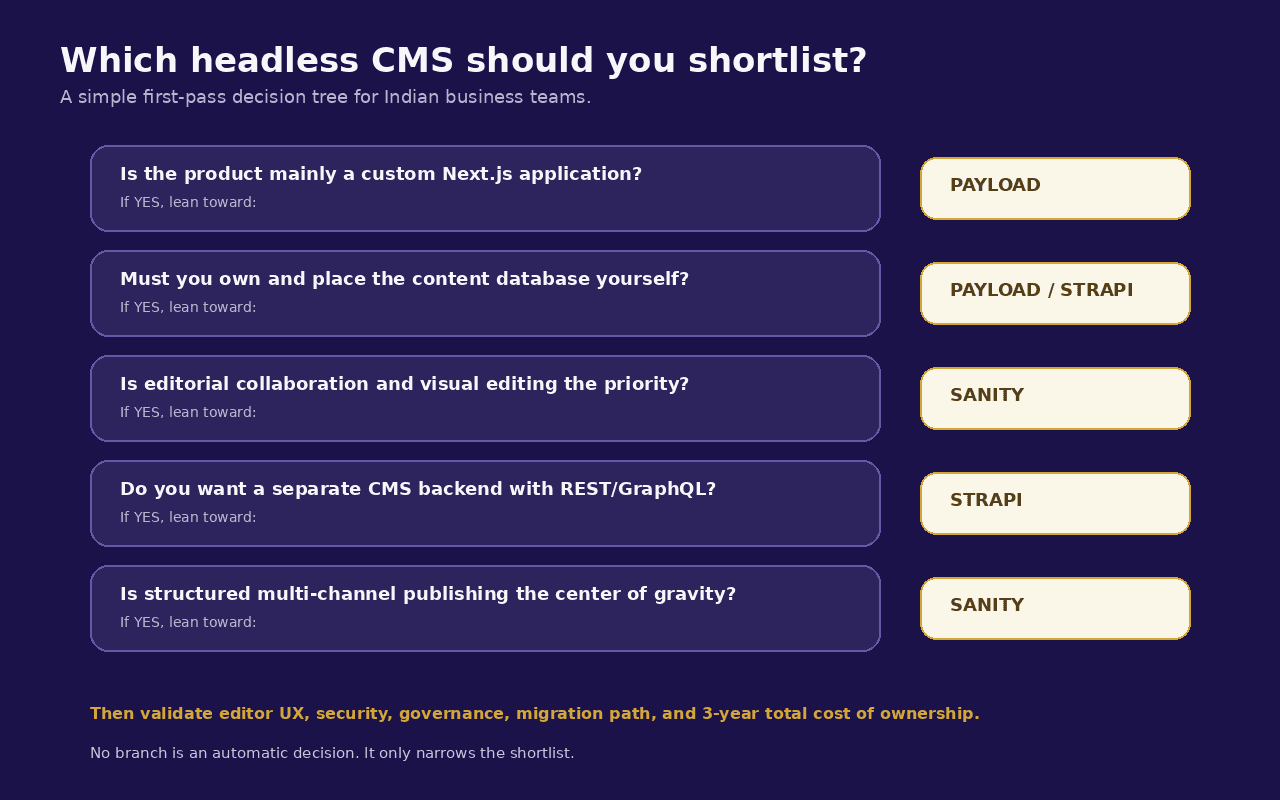
Start with the architecture, not the brand name.
- Question 1: Is this primarily a content website or a web application? If primarily content, lean Sanity or Strapi. If deeply application-like, lean Payload.
- Question 2: Must you own and place the content database in your infrastructure? If yes, lean Payload or self-hosted Strapi. If no, Sanity remains fully viable.
- Question 3: Is your engineering team strongly Next.js and TypeScript centered? If yes, Payload deserves serious consideration.
- Question 4: Is editorial collaboration and live visual editing the dominant requirement? If yes, Sanity deserves serious consideration.
- Question 5: Do you want a separate, conventional CMS backend with REST/GraphQL APIs? If yes, Strapi is a natural fit.
- Question 6: Is there a multi-channel content roadmap? All three can support it. Sanity's structured-content model is particularly strong for content reuse, while Strapi's API-first model and Payload's code-first model can also work well depending on how channels are built.
My recommendation by business scenario
Scenario 1: B2B services website with 10 to 30 editors
Likely choice: Sanity
Why: strong editorial experience, reusable content, real-time collaboration, visual preview, managed content backend.
Choose Payload instead if the site also contains substantial authenticated application logic.
Scenario 2: Customer portal or member platform built on Next.js
Likely choice: Payload
Why: authentication, access control, direct database ownership, application logic, and CMS in the same TypeScript ecosystem.
Scenario 3: Enterprise website with an internal infrastructure team and API-first architecture
Likely choice: Strapi
Why: open-source backend, familiar Node.js architecture, self-hosting, standard API boundary, relational database fit.
Scenario 4: Multi-brand content platform for several websites
Likely choice: Sanity or Strapi
Sanity if editorial collaboration and structured reuse dominate.
Strapi if infrastructure ownership and conventional APIs dominate.
Scenario 5: High-control deployment with India-region infrastructure
Likely choice: Payload or self-hosted Strapi
Both can be deployed on infrastructure you control. The choice then depends on whether you prefer integrated Next.js full-stack architecture or a separate CMS service.
Scenario 6: Marketing team with almost no internal engineering capacity
Likely choice: Sanity with an implementation partner
A managed content backend reduces operational burden. But editor workflows still need deliberate configuration.
What I would not use as selection criteria
GitHub stars alone
Popularity is useful but not a business architecture.
"Open source" as a complete answer
Open source tells you about licensing and control. It does not tell you total operating cost, editor experience, support quality, or implementation complexity.
Lowest first-year price
CMS decisions usually outlive the initial build.
Developer preference alone
The developer may leave. The content team will use the system every week.
AI feature count
AI features are changing too quickly for a procurement decision to depend on who has the longest AI menu this quarter.
Choose the content and application architecture first.
"It can do everything"
All three can be extended substantially.
The question is not whether something is technically possible.
The question is how much custom engineering and operational burden the capability creates.
A 15-point CMS evaluation checklist
Before choosing a headless CMS development company or approving a platform, score each candidate from 1 to 5 on these criteria.
- Editor ease of use
- Preview and visual editing
- Structured content modeling
- Next.js integration
- API/query flexibility
- Authentication and permissions
- Workflow and governance
- Localization
- Hosting flexibility
- Data ownership
- Security operations
- Developer hiring availability
- Upgrade path
- Three-year total cost of ownership
- Fit with the future product roadmap
Then weight the criteria.
For a media company, editorial experience may deserve 20% of the total score.
For a portal, authentication and application logic may deserve 20%.
For a regulated enterprise, hosting and governance may dominate.
Do not use equal weights unless every requirement is genuinely equal.
Questions to ask a headless CMS development company
If an agency recommends one platform immediately, ask why.
A good discovery conversation should include questions such as:
- How many content editors will use the system?
- What content types do you publish today?
- What will the same content need to power in three years?
- Do you require self-hosting?
- Do you need an India-region deployment?
- Which enterprise features are mandatory?
- How will preview work?
- How will editors create landing pages without developers?
- What is the backup and restore plan?
- What is the upgrade strategy?
- How are roles and permissions modeled?
- How will structured data and SEO metadata be managed?
- What is the migration and exit strategy?
- What does ongoing maintenance cost?
- Which parts are platform fees versus infrastructure versus agency support?
The CMS should be chosen after these answers, not before them.
Final verdict
Sanity, Payload, and Strapi are all credible modern platforms.
They represent three different philosophies.
Sanity says: let the content platform be managed, real-time, structured, collaborative, and highly customizable for editors.
Payload says: put the CMS inside the application stack, own the code and database, and use one TypeScript/Next.js ecosystem for content plus product logic.
Strapi says: run an open-source CMS backend as a service, expose clean APIs, and choose whether to self-host or use managed infrastructure.
For an Indian business, the right choice depends less on which logo appears in the most technology stacks and more on which operating model your organization can sustain.
The CMS you choose should make editors faster, developers more confident, integrations cleaner, governance clearer, and the next three years of the roadmap easier to execute.
If it does not, it is the wrong CMS, regardless of how modern it looks in the demo.
About MagicWorks
MagicWorks IT Solutions is an AI-first digital marketing and web development agency based in Pune, India. Our current AI-native website architecture uses Next.js with an LLM-backed backend and a headless CMS, with Sanity, Payload, or Strapi chosen according to the project rather than standardized blindly.
Explore:
- AI-Native Website Development
- Web Development at MagicWorks
- What Is an AI-Native Website, and Why Your Next Build Should Be One
- Portals and Member Sites
Sources and further reading
- MagicWorks, "AI-Native Website Development"
- Sanity Docs, "Hosting and deployment - Sanity Studio"
- Sanity Docs, "Studio"
- Sanity Docs, "Real-time updates"
- Sanity Docs, "Visual Editing"
- Sanity Docs, "GROQ introduction"
- Sanity, "Pricing"
- Payload Docs, "What is Payload?"
- Payload Docs, "Installation"
- Payload Docs, "Database"
- Payload, "Get started"
- Payload Docs, "Production Deployment"
- Strapi, "Self-host Strapi"
- Strapi 5 Documentation
- Strapi, "Features"
- Strapi Support, "Understanding Strapi Cloud usage and billing"
- Strapi, "Cloud Pricing"
- Sanity Docs, "How AI Credits work"
- Payload, "Release Notes"
Choosing Between Sanity, Payload and Strapi?
MagicWorks builds AI-native websites on Next.js and selects Sanity, Payload, or Strapi per project rather than defaulting to one platform. If you want an independent recommendation based on your team, editors, hosting requirements, and roadmap rather than a vendor's own pitch, we are happy to walk through it with you.
Explore MagicWorks Web Development, or
book a discovery conversation to get an independent recommendation for your headless CMS architecture.