Most conversations about AI-native websites begin in the wrong place.
They begin with the technology stack.
Next.js. Large language models. Vector search. Headless CMS. APIs. Agents. Personalization engines.
All of those matter to the team building the website. None of them is the first thing your customer cares about.
Your customer cares about something much simpler:
Can I get what I came here for with less effort, less uncertainty, and less waiting?
That is the practical test of an AI-native website.
At MagicWorks, we define an AI-native website as a site where intelligence is built into how the website works, not added later as a decorative chatbot. Our current web development architecture uses a Next.js front end, an LLM-backed backend, and a headless CMS, with features such as intelligent search, content personalization, recommendations, conversational lead capture, and AI-assisted workflows included where they earn their place.
This article deliberately avoids starting with architecture. Instead, it follows the customer journey before and after an AI-native redesign.
For the underlying concept and definition, see our related explainer, What Is an AI-Native Website, and Why Your Next Build Should Be One.
The central question is not, “Where can we put AI on the website?”
It is:
Which moments in the customer journey are currently slow, confusing, repetitive, generic, or dependent on a human, and can the website take useful work out of those moments?
The short answer: what actually changes for the visitor?
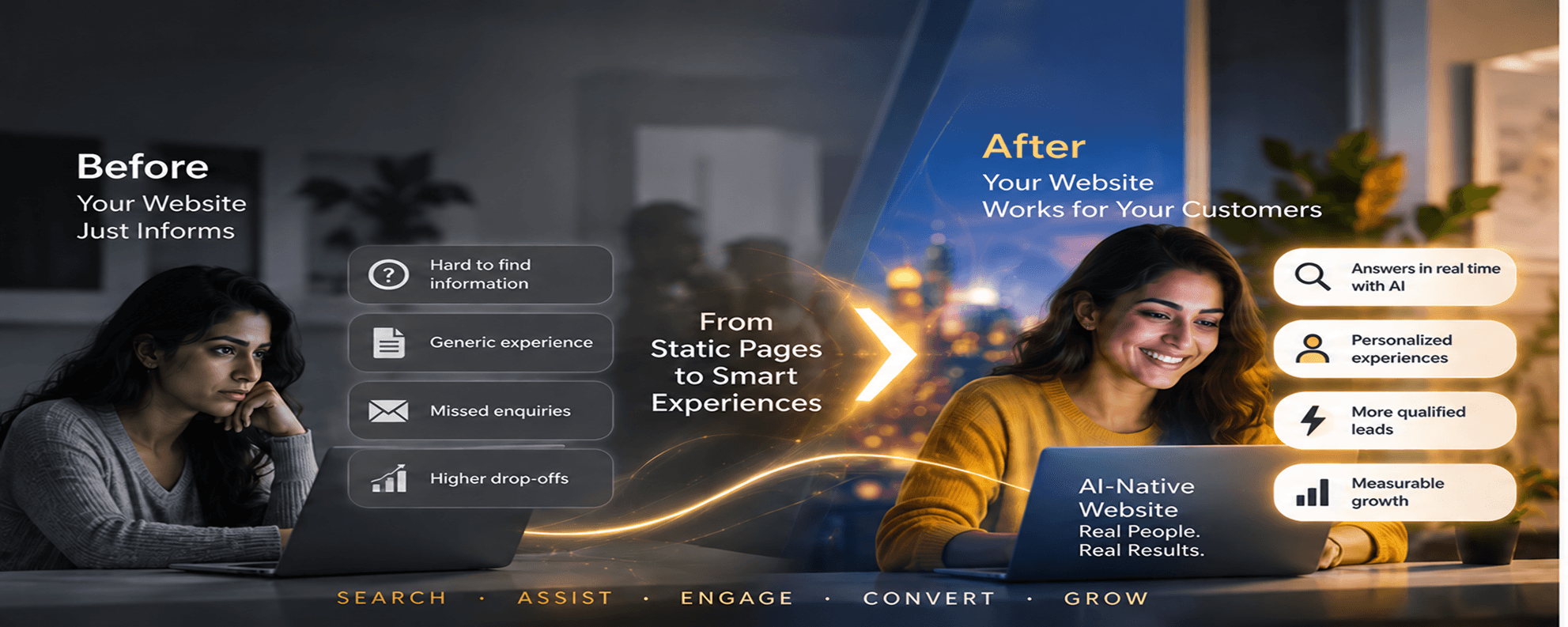
A conventional website mostly waits for the visitor to understand its structure.
An AI-native website can increasingly understand the visitor's intent and respond to it.
That change can show up in seven visible ways:
- Visitors can ask instead of hunt.
- Search can understand meaning instead of only matching keywords.
- The site can present more relevant content based on context.
- Forms can become guided conversations instead of dead-end data collection.
- Recommendations can become useful rather than generic.
- Complex choices can be explained interactively.
- The website can learn from customer questions and improve the journey over time.
The important word is can.
AI-native does not mean every page should talk, every visitor should be profiled, or every action should be automated. A good implementation uses intelligence selectively, keeps human control where judgment matters, and measures whether the experience is actually better.
Why this matters now: digital friction is still expensive
Companies have spent years improving visual design, mobile responsiveness, SEO, and page speed. Yet users still encounter substantial friction online.
Contentsquare's 2026 Digital Experience Benchmark analysis examined more than 99 billion sessions across 6,500 websites and reported that 35.2% of sessions were still affected by friction. It also found that API errors rose 16% year over year, even as slow-load frustration improved.
That is a useful reminder for anyone planning an AI website redesign.
The goal is not to add more complexity to an already fragile experience.
The goal is to remove friction.
A customer should not need to understand your internal departments, product taxonomy, service naming, website navigation, or lead-routing logic just to get an answer.
A more intelligent website can absorb some of that complexity on the customer's behalf.
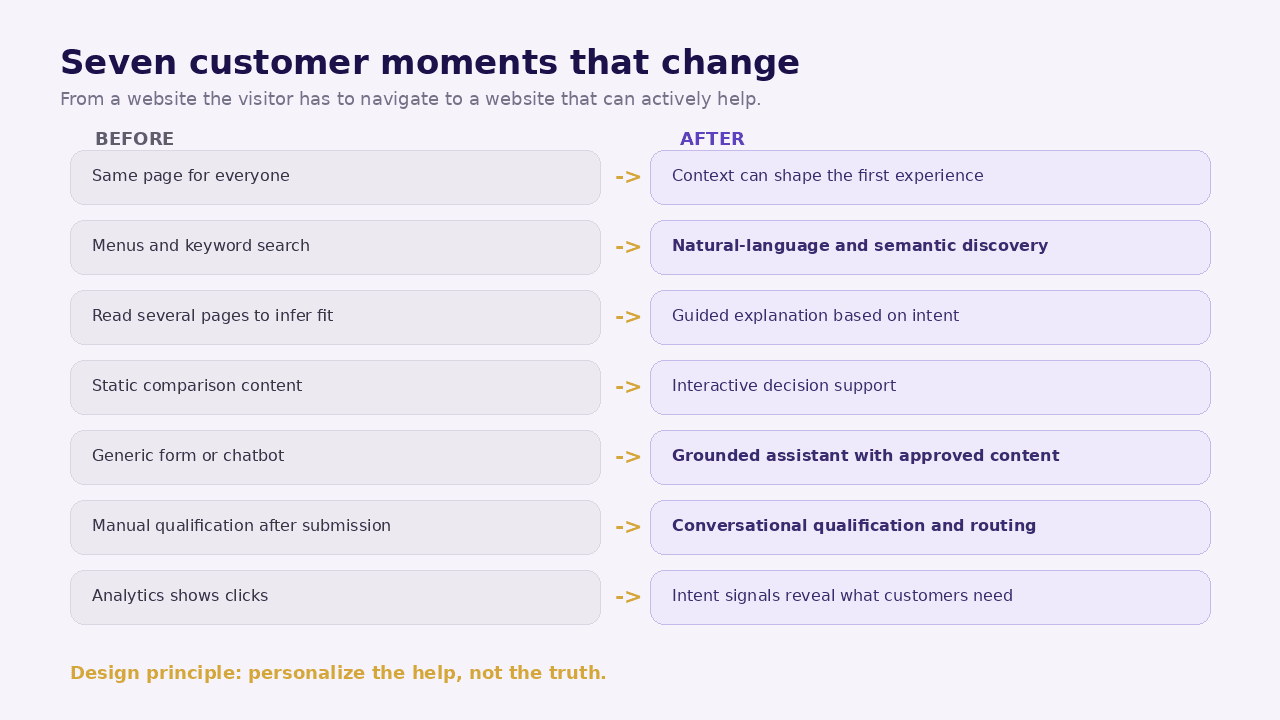
Before and after: the customer journey at a glance
| Metric | Conventional website | AI-native website |
|---|---|---|
| Arriving | Same page for everyone | Context can shape the first experience |
| Finding information | Menus, filters, keyword search | Natural-language and semantic discovery |
| Understanding an offer | Read multiple pages and infer fit | Guided explanation based on the customer's question |
| Comparing options | Static comparison table | Interactive decision support with clear guardrails |
| Asking a question | Form, phone call, generic chatbot | Grounded assistant using approved business content |
| Becoming a lead | Long form and manual qualification | Conversational capture and structured qualification |
| Returning later | Mostly starts again | Prior context can inform the next step where consent and policy allow |
The table makes the change look simple. The real difference becomes clearer when we walk through each moment.
Before: the visitor has to learn your website. After: the website can learn the visitor's intent
A traditional website places the burden of interpretation on the visitor.
The visitor arrives with a goal such as:
- “I need an AI audit for a 200-person manufacturing company.”
- “I need to know whether this agency can migrate us from WordPress.”
- “I am comparing three MBA programs for working professionals.”
- “I need a service provider in Pune who can work with our existing ERP.”
The site may organize information very differently:
- Services
- Solutions
- Industries
- Resources
- About
- Contact
Those labels make sense to the business. They are not always how the buyer thinks.
Before
The visitor translates their problem into your navigation.
They guess which page might contain the answer. They open two or three tabs. They scan. They return to Google. They leave a form only if enough confidence has been created.
After
An AI-native layer can interpret the visitor's natural-language intent and route them to the most relevant answer, content, comparison, tool, service page, or next action.
For example, a visitor could ask:
“We are a mid-size manufacturing company and most RFQs still come by email. Where would AI actually help first?”
The website should not answer with generic AI enthusiasm.
A well-designed assistant might instead:
- recognize the manufacturing context;
- retrieve the site's relevant AI process-audit and manufacturing content;
- ask one clarifying question about RFQ volume or current workflow;
- explain two or three realistic starting points;
- link to the appropriate service or article;
- offer a conversation with a human if the situation is complex.
That is not a better chatbot.
It is a different information architecture from the customer's point of view.
Before: search matches words. After: search can understand meaning
Site search has historically been one of the weakest experiences on many business websites.
A visitor types “ERP integration with AI” and gets no results because the website uses the phrase “AI-enabled workflow integration.”
Or they search for “fees” while the content uses “pricing.”
Or they ask a complete question and the search box treats it as a bag of keywords.
What semantic search changes
An AI-native search experience can use meaning, context, structured content, and retrieval to find relevant material even when the wording differs.
The customer gets closer to an answer and farther from a list of blue links inside your own website.
But this only works well when the content layer is clean.
If your CMS contains outdated pages, duplicated services, contradictory prices, missing metadata, and poorly structured documents, AI search can retrieve the wrong thing faster.
This is why the content architecture matters as much as the model.
A practical before-and-after example
Before: Visitor query: “Can you build a portal where dealers see different prices?”
Results: zero matches, because the website has a page called Role-Based Member Portals.
After: The system understands that dealer-specific prices relate to authenticated roles and permissions.
It surfaces the portals page, summarizes the relevant capability, and asks whether pricing rules come from an ERP, CRM, or the portal database.
The visitor has moved from searching to solving.
Before: every visitor sees the same message. After: the experience can become context-aware
Most websites personalize only in trivial ways.
A returning user may see a recently viewed item. An e-commerce site may recommend similar products. A B2B website often does nothing at all.
AI-native personalization can be more useful, but it must be handled carefully.
A visitor from a manufacturing campaign may benefit from manufacturing case studies and process examples. A visitor who arrived from an article about GEO may benefit from AI visibility resources. A returning prospect who previously explored an AI process audit may need a comparison checklist rather than another introductory explanation.
The right principle
Personalize the help, not the truth.
The website should not invent a different company for each visitor. Core claims, prices, legal terms, capabilities, and evidence should remain consistent.
What can change is:
- which content is prioritized;
- which examples are shown first;
- which question is asked next;
- which CTA is most relevant;
- which resources are recommended;
- how much explanation is needed.
This is closer to a good salesperson adapting the conversation than to a website secretly manipulating the visitor.
Privacy and trust are part of the feature
Context-aware experiences need a clear consent and data-governance model.
Do not assume that because an AI system can infer something, the website should act on it.
For many businesses, useful personalization can be achieved with low-risk signals such as:
- current page;
- campaign source;
- selected industry;
- explicit answers in a conversation;
- language preference;
- previously viewed content where consent permits.
Sensitive data should not be collected simply because a conversational interface makes collection easier.
Before: the form collects. After: the conversation can qualify
The standard B2B lead form has barely changed in twenty years:
Name. Email. Phone. Company. Message.
The form tells the sales team almost nothing about urgency, budget, current system, decision stage, internal constraints, or whether the visitor is a good fit.
So the team follows up manually and asks the questions the website could have asked.
The AI-native alternative
Conversational lead capture can ask one relevant question at a time.
A web-development prospect might be guided through:
- What are you trying to build or replace?
- Is the current site on WordPress, a custom stack, or something else?
- Which capabilities matter most: content publishing, lead generation, portal access, commerce, AI search, personalization, or something else?
- What is the target launch window?
- Does the project need integration with a CRM, ERP, payment system, or internal database?
The result is not merely a lead.
It is a structured brief.
The customer also benefits because they do not need to write a perfect project description from scratch.
Do not turn qualification into interrogation
A bad implementation simply converts a ten-field form into ten chat questions.
That is slower.
The assistant should know when to stop.
If four answers are enough to route the lead, collect four. Ask for contact information at the moment when the customer understands why continuing the conversation is useful.
Before: content explains. After: content can participate in the decision
A static page is passive.
It says, “Here are our services.”
An intelligent page can help a customer answer, “Which of these services is relevant to me?”
That distinction is important.
Consider a business comparing WordPress with an AI-native stack.
A conventional page lists pros and cons.
An AI-native experience can ask:
- How many editors do you have?
- Do you need authenticated users?
- Is the site mainly a brochure or part of an operational workflow?
- How often do you publish?
- Do you need personalization or AI search?
- Does your team need to self-host the CMS?
It can then explain the trade-offs using approved rules and source content.
The visitor is still making the decision. The website is helping them structure it.
This is where grounded AI matters
The assistant should retrieve from a controlled knowledge base, product catalog, CMS, or verified data source.
It should not improvise commercial promises.
For business-critical decisions, include clear rules such as:
- never invent a price;
- never promise a delivery date that is not in the source system;
- never claim a feature that is not documented;
- distinguish opinion from policy;
- escalate ambiguous or high-value questions to a human.
AI-native should mean more useful, not more unpredictable.
Before: recommendations are generic. After: they can be situational
Most website recommendations are basic:
- related posts;
- popular products;
- people also viewed;
- latest resources.
Useful, but not necessarily relevant to the visitor's current decision.
A smarter recommendation layer can consider the task.
For example, a user reading about an AI process audit might receive:
- a readiness checklist if they are still evaluating;
- a manufacturing use-case article if they selected manufacturing;
- a vendor due-diligence checklist if they are comparing providers;
- a case study if they are close to buying;
- a discovery call if their question cannot be answered responsibly online.
This turns content from a library into a guided path.
Before: support begins after the form. After: useful assistance can start immediately
Many business websites are open 24/7 while the business is not.
That gap matters most when a visitor has a simple but decisive question:
- Do you serve our city?
- Can you integrate with our current system?
- Do you work with companies of our size?
- Is this service consulting only or implementation too?
- What information do we need before a discovery call?
If the answer exists somewhere on the site, making the user wait until the next working day is unnecessary friction.
An AI-native assistant can provide immediate, grounded answers and then create a clean handoff.
The handoff is part of the customer experience
The human should receive context such as:
- what the visitor asked;
- what pages or resources were discussed;
- which answers were given;
- what the visitor said about their requirement;
- where the AI was uncertain;
- preferred contact method.
The customer should not have to repeat the entire conversation.
That simple continuity is one of the clearest signs that AI is built into the workflow rather than sitting on top of the website.
Before: analytics tells you what people clicked. After: intent becomes measurable
Traditional web analytics is strong at behavior:
- page views;
- sessions;
- traffic sources;
- events;
- conversions;
- funnels.
AI-native interaction adds a new class of signals: what people are trying to accomplish.
A month of anonymized and appropriately governed assistant queries might reveal that customers repeatedly ask:
- whether your service works with a specific platform;
- what your minimum engagement is;
- how quickly implementation begins;
- whether you support a particular industry;
- how your approach differs from a competitor;
- what happens after launch.
Those questions are not merely support data.
They are inputs to content strategy, product strategy, sales enablement, SEO, AEO, GEO, FAQ design, service packaging, and roadmap decisions.
A new feedback loop appears
The process can become:
Question -> Answer -> Outcome -> Content gap -> Improvement -> Better future answer
That is what MagicWorks means when we say an intelligent website can compound over time.
The website does not “learn” by silently rewriting itself. It learns operationally because the team gains better evidence about customer intent and can improve approved content, rules, workflows, and prompts.
The AI-native customer experience stack
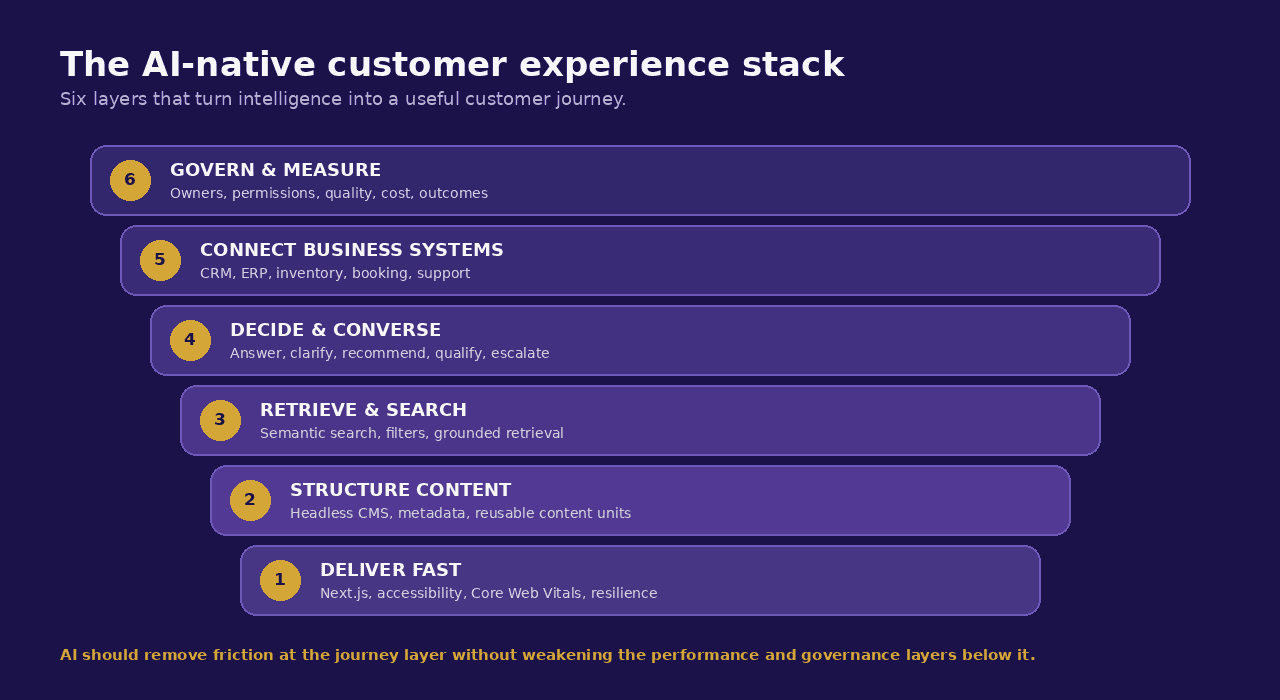
A practical architecture can be understood as six layers from the customer's point of view.
1. Fast, accessible front end
AI does not excuse a slow website.
Google's current Core Web Vitals targets remain a useful baseline: Largest Contentful Paint of 2.5 seconds or less, Interaction to Next Paint of 200 milliseconds or less, and Cumulative Layout Shift of 0.1 or less, measured at the 75th percentile.
The more APIs and intelligent features you add, the more carefully performance needs to be managed.
2. Structured content layer
The CMS should store content in reusable, structured units rather than trapping everything inside visual page-builder blobs.
That makes content easier to publish, reuse, retrieve, localize, personalize, and expose to multiple channels.
3. Retrieval and search layer
This layer helps the system find the most relevant approved information for a user's question.
It may include semantic search, keyword search, metadata filters, retrieval-augmented generation, or a combination.
4. Decision and conversation layer
This is where the experience decides what to do next:
- answer;
- ask a clarifying question;
- recommend content;
- calculate;
- qualify;
- route;
- escalate.
5. Business-system integration layer
Useful intelligence often requires live business context from systems such as:
- CRM;
- inventory;
- booking system;
- ERP;
- product database;
- support platform;
- marketing automation;
- analytics.
This is the layer that separates a clever demo from an operational website.
6. Governance and measurement layer
Every AI feature should have defined owners, sources, permissions, failure handling, monitoring, cost controls, and success metrics.
Without this layer, the website may be intelligent but not manageable.
What does not change when a website becomes AI-native?
This question is as important as what changes.
Your positioning still needs to be clear
AI cannot rescue a company that cannot explain what it does.
Your content still needs expertise
Google's 2026 guidance for generative AI search explicitly emphasizes unique, valuable, non-commodity content and says foundational SEO best practices continue to matter.
AI can help users access your expertise. It should not manufacture expertise that the business does not have.
Your UX still needs discipline
Every intelligent interaction should have a visible purpose.
Do not interrupt visitors with a chat bubble, quiz, recommendation rail, pop-up, and personalization banner at the same time.
Your sales team still matters
For high-consideration services, the website should make human conversations better, not eliminate them.
Your legal and privacy obligations still apply
An AI feature is not a separate universe. The same standards for consent, data handling, security, claims, accessibility, and customer communication still apply.
How to decide which AI-native features deserve to launch first
Do not begin with a feature list.
Begin with a friction list.
Ask five questions for each candidate feature.
- Does this solve a repeated customer problem? Prevents novelty-driven development.
- Do we have reliable data or content to power it? Reduces hallucination and stale answers.
- Can we define a safe failure path? Protects the customer when AI is uncertain.
- Can we measure a business or experience outcome? Makes ROI testable.
- Is AI materially better than a simpler rule or UI? Prevents overengineering.
Example prioritization
For a B2B services website:
High priority: intelligent search, grounded Q&A, conversational lead qualification, content recommendations.
Medium priority: personalization by explicit industry or use case, proposal pre-qualification, interactive calculators.
Low priority at launch: autonomous negotiation, unsupervised commercial commitments, complex agent workflows with weak data controls.
The order will vary by business.
The principle should not.
A realistic before-and-after measurement plan
A website redesign should never be judged by whether the AI demo looks impressive.
Measure customer behavior before launch and compare it after launch.
Baseline metrics
Capture at least four weeks of pre-launch data for:
- conversion rate by key journey;
- search usage and search exits;
- form-start and form-completion rate;
- average time to first qualified response;
- bounce or abandonment on key pages;
- lead-to-opportunity quality;
- support questions generated by the website;
- Core Web Vitals;
- content discovery depth;
- top internal-search terms with no useful result.
AI-native metrics
Add:
- assistant engagement rate;
- answer success rate;
- unanswered or escalated question rate;
- percentage of conversations leading to a useful next action;
- qualified lead rate from conversational journeys;
- recommendation click-through rate;
- content-gap themes discovered from questions;
- cost per successful AI interaction;
- human handoff rate and handoff quality;
- answer accuracy from periodic review samples.
The most important measurement rule
Do not optimize for chat volume.
A customer who finds the answer instantly without opening the assistant may be having the better experience.
The target is lower friction and stronger outcomes, not more AI usage.
What a sensible AI-native redesign process looks like
MagicWorks' current AI-native service describes a discovery, design/build, and launch/AMC process, with AI features scoped per project rather than forced into every build.
For a business evaluating the idea, I would break the work into four practical phases.
Phase 1: Journey audit
Map the top customer journeys and identify where visitors currently:
- search repeatedly;
- abandon;
- ask sales basic questions;
- use the wrong form;
- misunderstand an offer;
- fail to find content;
- wait unnecessarily for a human.
Phase 2: Data and content readiness
Identify the sources the website would need to answer or act reliably:
- service pages;
- product catalog;
- policy documents;
- CRM fields;
- pricing rules;
- FAQs;
- case studies;
- knowledge base;
- inventory;
- calendars;
- account data.
Classify what is public, private, sensitive, stale, or contradictory.
Phase 3: Prototype one high-value journey
Do not build six AI features at once.
Prototype one complete customer journey from question to outcome.
For example:
Visitor asks -> assistant clarifies -> approved answer retrieved -> relevant service recommended -> lead qualified -> CRM record created -> human receives context.
Test that journey with real scenarios, including wrong questions, incomplete information, and edge cases.
Phase 4: Launch with monitoring
Once live, monitor:
- performance;
- accuracy;
- latency;
- AI cost;
- conversion;
- failed answers;
- content gaps;
- customer feedback.
An AI-native website needs maintenance in the same way that a paid-media account or CRM workflow does. The system is not finished at launch.
Is an AI-native website automatically better than WordPress?
No.
A simple brochure website with a few pages, infrequent updates, no complex workflows, and no need for intelligent features may be perfectly well served by WordPress.
MagicWorks explicitly continues to offer WordPress when it is genuinely the right fit, while using AI-native architecture as the default for more ambitious new builds.
The decision should depend on the work the site needs to do.
Choose the simpler architecture when
- the website is mainly informational;
- content changes are infrequent;
- the budget is limited;
- there is no meaningful personalization or workflow requirement;
- the business is unlikely to use the added flexibility.
Consider AI-native architecture when
- the website is a major lead-generation channel;
- users struggle to navigate a large content set;
- different audiences need different guidance;
- the site must integrate with operational systems;
- conversational qualification would save sales time;
- search and recommendations materially affect conversion;
- the roadmap includes portals, intelligent workflows, or multiple channels;
- the site is expected to evolve for several years.
The expensive mistake is not choosing WordPress.
The expensive mistake is buying architecture that cannot support the roadmap you already know is coming.
How does AI-native design affect SEO, AEO, and GEO?
It can help, but not because Google rewards the label “AI-native.”
A modern architecture can make it easier to produce:
- fast pages;
- structured content;
- clean internal linking;
- reusable author and organization data;
- server-rendered or statically rendered content;
- descriptive metadata;
- machine-readable structured data;
- rich answer-oriented content;
- content that can be updated consistently across channels.
Google's 2026 generative AI optimization guidance says traditional SEO foundations remain relevant to AI Overviews and AI Mode, and it specifically recommends clear technical structure plus unique, helpful content.
In other words, the architecture creates capability. The content and implementation still determine whether that capability is used well.
The customer experience test: seven questions for your next website brief
Before approving an AI-native website, ask the project team these seven questions.
- What becomes easier for the customer on day one?
- Which questions can the site answer reliably that it cannot answer today?
- Which journeys become shorter?
- Which repetitive work is removed from sales, support, or operations?
- Which data sources power the answers, and who owns their accuracy?
- What happens when the AI does not know?
- Which metric will prove the feature made the experience better?
If the answers are vague, the project is probably technology-led rather than customer-led.
Final takeaway: the website should feel less like software and more like help
The best AI-native experiences will not necessarily look futuristic.
The customer may not even notice that AI is involved.
They will notice that:
- the right information appeared sooner;
- the site understood the question;
- the next step made sense;
- they did not have to repeat themselves;
- the recommendation felt relevant;
- the form was easier;
- the handoff to a person was smoother.
That is the before-and-after that matters.
AI-native web development should not be sold as a collection of fashionable features. It should be designed as a systematic reduction of customer effort.
If your next redesign brief begins with “add AI,” rewrite the brief.
Begin with the customer journey.
Then decide where intelligence earns its place.
MagicWorks IT Solutions is an AI-first digital marketing and web development agency based in Pune, India. Our AI-native website service uses a Next.js front end, LLM-backed backend, and headless CMS architecture, with intelligent capabilities such as search, personalization, recommendations, chat agents, and conversational lead capture scoped according to the business case.
Thinking About an AI-Native Website?
MagicWorks designs and builds AI-native websites using a Next.js front end, an LLM-backed backend, and a headless CMS, with search, personalization, recommendations, and conversational lead capture scoped to what each business actually needs. If a simpler WordPress build is the right fit, we say so.
Explore AI-Native Website Development to see what a scoped implementation could look like, or
book a discovery conversation with our team, and bring your own before-and-after questions: what should get easier for your customers, and what should stay exactly the same.