The most expensive part of a website is often the work it fails to do.
It may look polished. The homepage may carry the right colours, the service pages may be technically complete, and the contact form may send an email to somebody. Yet after the launch, marketing still cannot explain which pages create qualified enquiries. Sales still receives incomplete leads. Follow-up still depends on somebody noticing an email. Management still sees traffic in one report, campaign spend in another, and revenue in a third.
The website is live, but the commercial system is disconnected.
That is the difference between a brochure and a sales operating system. A brochure displays information. A sales operating system receives demand, interprets intent, helps buyers make progress, captures useful context, routes opportunities, triggers follow-up, and returns outcome data so the next visitor gets a better experience.
The short answer: A website sales operating system is a connected digital system in which acquisition, content, search, enquiry capture, qualification, CRM, follow-up and analytics work as one revenue process. The pages are the visible interface. The real value sits in the decisions, data flows, integrations and feedback loops behind them.
The essential flow is:
Traffic → intent → relevant page → action → qualification → CRM → follow-up → outcome → improvement.
If any handoff breaks, the website can appear successful while quietly losing business.
Buyers do not experience your departments. They experience one journey.
Inside a company, paid media, SEO, web development, content, CRM and sales may belong to different people. The buyer does not care. A prospect who searches on Google, reads a comparison page, returns through LinkedIn, asks a question in chat and finally speaks to sales experiences one continuous relationship with the company.
The evidence supports this connected view. McKinsey's 2024 B2B Pulse research, based on nearly 4,000 B2B decision makers across 13 countries, found that buyers use an average of ten interaction channels during the buying journey. The company website was among the most frequently used touchpoints. More than half of respondents said they were likely to turn to another supplier when the experience across channels was not smooth. In the same research, 51% identified a lack of customer tracking across channels as an impediment to doing business.
Salesforce's 2024 State of Service findings point to the same expectation from another direction. Seventy-three percent of business buyers wanted companies to anticipate their needs, while only 33% of customers believed companies generally anticipated and acted on needs proactively. That gap is not solved by adding another homepage banner. It is solved by connecting customer context to the next appropriate action.
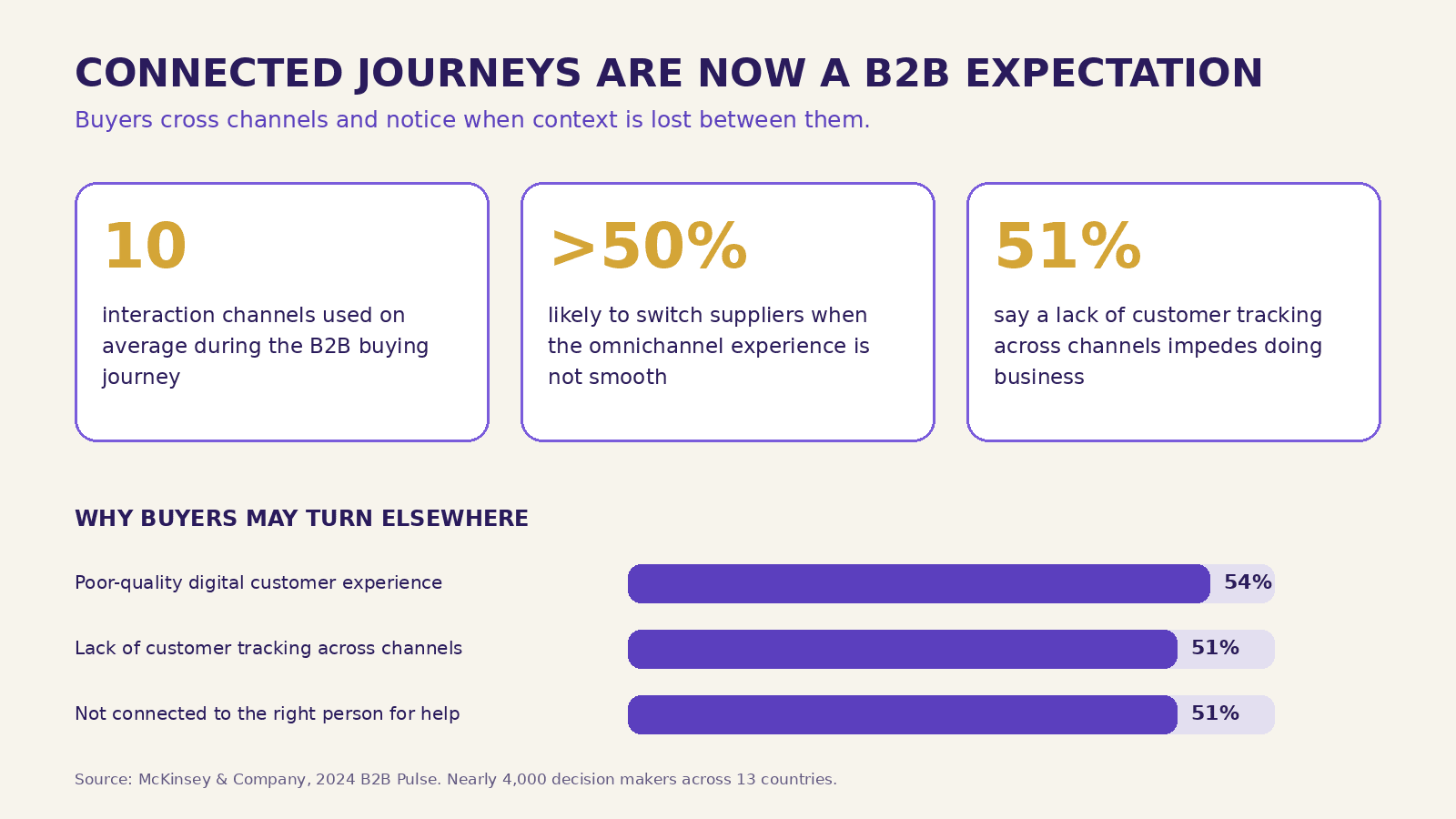
These statistics should not be treated as universal conversion promises. They come from different studies with different samples. Together, however, they show a consistent operating reality: buyers move between channels, expect continuity, and notice when the business forgets what they have already told it.
Your website sits at the centre of that journey. It is where anonymous attention can become identifiable intent. It is also where useful context is most often discarded.
What does “website as a sales operating system” mean?
The phrase does not mean that your website replaces the sales team, CRM or marketing platforms. It means the website coordinates them around the buyer's next decision.
A well-designed sales operating system performs seven jobs:
- Attract the right demand. It receives visitors from search, advertisements, social media, referrals, email, partner links and direct visits with source context intact.
- Recognise likely intent. It uses the landing page, search term, campaign, location, device, behaviour and declared need to understand why a visitor may be present.
- Make the next step obvious. It presents useful proof, answers, comparisons and pathways based on the visitor's stage rather than forcing everybody through the same generic homepage.
- Capture meaningful context. Forms, chat and calls collect enough information to enable action without creating unnecessary friction.
- Qualify and route. The system distinguishes a strong opportunity from a vague enquiry, spam message, job application or support request, then sends it to the right owner.
- Trigger and support follow-up. The CRM creates ownership, reminders, service-level expectations, nurture sequences and a visible history.
- Learn from outcomes. Qualified lead, opportunity, sale and lost-reason data return to marketing and content decisions.
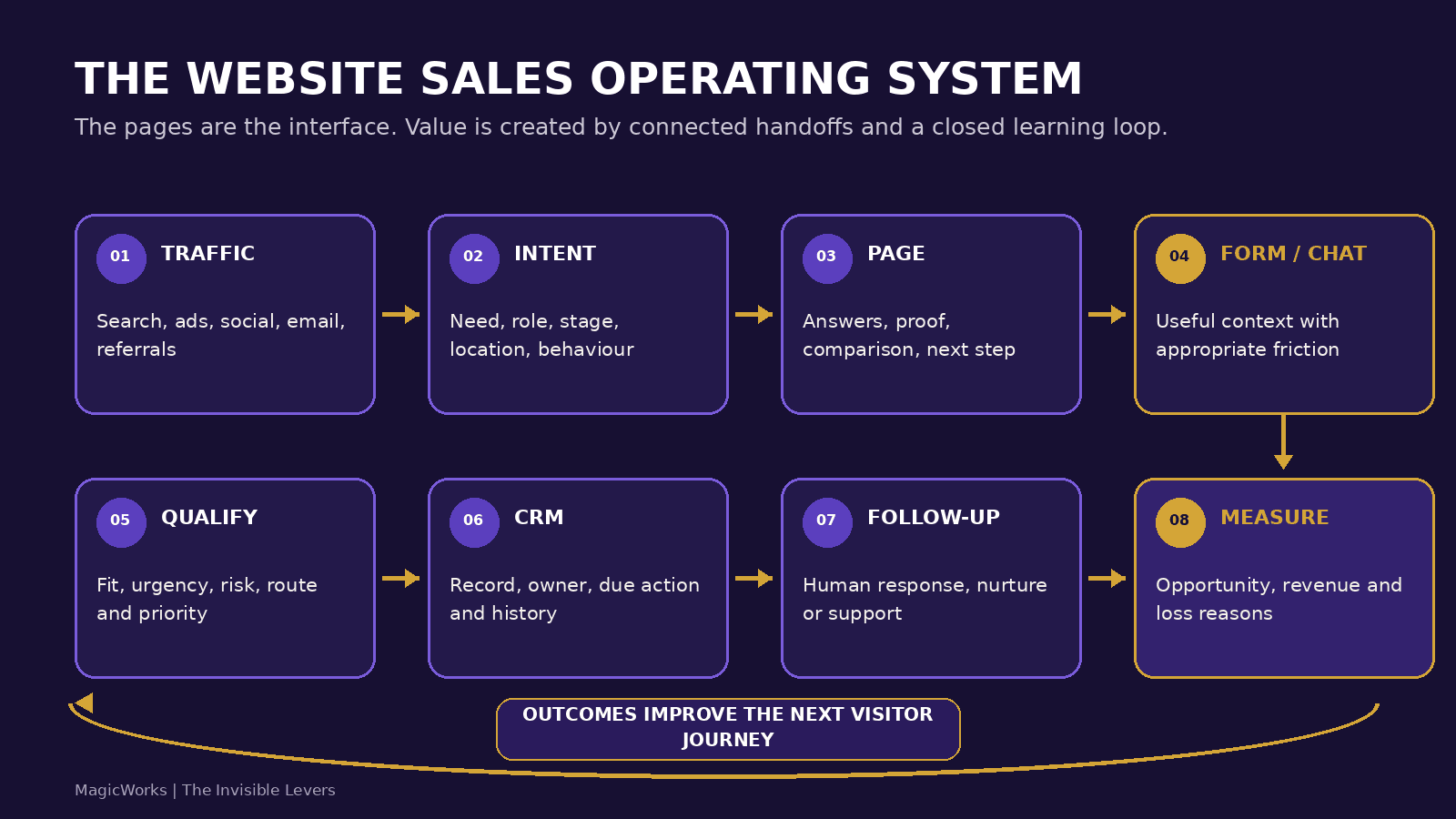
The homepage is not the system. The form is not the system. The CRM is not the system. The operating system is the set of agreed handoffs between them.
A brochure site and a sales operating system can look equally good
This is why the problem is easy to miss. A brochure site is not necessarily ugly or outdated. It can win design awards. A sales operating system may use a restrained visual design. The distinction becomes visible only when you trace what happens before and after a visitor sees the page.
| Metric | Brochure website | Website sales operating system |
|---|---|---|
| Primary purpose | Present the company | Move the right buyer to the right next action |
| Traffic | Count visits and sessions | Preserve source, campaign and intent context |
| Content | Describe services | Answer buyer questions by stage, role and use case |
| Conversion | One generic contact form | Multiple deliberate actions with appropriate friction |
| Lead data | Name, email, phone, message | Identity plus source, need, urgency, fit and consent |
| Routing | Send an email notification | Assign an owner using explicit business rules |
| Follow-up | Depends on individual memory | Uses CRM tasks, response standards and nurture |
| Measurement | Traffic, rankings and form submissions | Qualified leads, opportunities, revenue and loss reasons |
| Improvement | Redesign every few years | Review and optimise continuously |
| AI | Add a chatbot because it is fashionable | Apply intelligence only where a defined workflow benefits |
A brochure asks, “What information should we publish?” A sales operating system asks, “What must happen when a buyer with this need arrives?”
That second question changes the project brief. Navigation becomes journey design. Content becomes decision support. Analytics becomes operational instrumentation. Forms become data capture. Integrations become handoffs. Maintenance becomes continuous revenue improvement.
The seven layers of a website sales operating system
1. Acquisition must carry context into the site
Traffic is not one thing. A visitor searching for “ERP implementation partner for manufacturing” is in a different state from someone who clicked a general awareness post. A returning customer looking for support is different from a first-time buyer. A school admissions lead in Pune may require a different response from an overseas partnership enquiry.
The acquisition layer should preserve enough context to distinguish them. At minimum, this usually includes:
- landing page and previous page;
- source and medium;
- campaign and content identifiers;
- advertising click IDs where relevant;
- first visit and latest visit timestamps;
- device and broad location signals, handled with appropriate privacy controls; and
- any declared product, service or location interest.
UTM parameters are useful, but only if they survive the journey. A common failure occurs when the parameters are available on the landing page but disappear before the person submits a form three pages later. Marketing then knows a lead exists but cannot connect it reliably to the campaign that created it.
Preserving context is not merely an analytics task. It affects sales. A salesperson who can see that an enquiry came from a manufacturing case study, returned twice, and requested an implementation timeline can open the conversation differently from one who receives only “New website lead.”
2. Intent should shape the next pathway
The website does not need to read a visitor's mind. It needs to provide clear routes for the intents the business already understands.
For a B2B services company, those intents may include:
- understand the problem;
- compare approaches;
- assess credibility;
- see evidence from a similar industry;
- estimate scope, time or investment;
- speak to an expert;
- request a proposal;
- find support; or
- explore a career.
The page should make the likely next step visible without pretending every visitor is ready for a sales call. An early-stage buyer may need a diagnostic article or checklist. A buyer with a live requirement may need a short project form. An existing customer may need a support route that does not enter the sales pipeline.
This is where site architecture becomes commercial architecture. Service pages, industry pages, case studies, articles and tools should not exist as isolated content types. They should form intentional paths that help a buyer reduce uncertainty.
3. Content should help the buyer make a decision
Brochure copy says what the company does. Decision-support content explains when the service is appropriate, what alternatives exist, what the process requires, what risks matter and what a good result looks like.
Useful content answers questions such as:
- Is this solution suitable for a company of our size?
- What will our team need to contribute?
- What is included and excluded?
- How long will implementation take?
- What should we measure before launch?
- Which risks or dependencies could change the plan?
- How is this different from a cheaper or simpler option?
These answers improve conversion because they improve fit. They may also discourage an unsuitable enquiry, which is a commercial benefit. A sales operating system is not designed to maximise raw lead volume. It is designed to create more productive movement between buyer need and business capability.
The content layer is also central to SEO, AEO and GEO. Google's July 2026 guidance on generative AI search emphasises unique, non-commodity, expert-led content, clear organisation, crawlability, good page experience and relevant images. It explicitly says that foundational SEO remains relevant and that special “AEO/GEO hacks” are not required.
That is good operating-system logic. The same page that helps a human compare choices gives search and answer systems clearer evidence to retrieve, interpret and cite.
4. Conversion should match the value and stage of the interaction
Many websites use one contact form for everything. It asks the same questions of a serious buyer, a student, a vendor, a job applicant and a person sending spam. The form is easy to build, but the resulting queue is expensive to operate.
A better conversion architecture offers a small set of deliberate actions:
- Low commitment: download a relevant resource, subscribe, save a comparison or ask a narrow question.
- Medium commitment: request an assessment, share a requirement, calculate an estimate or book a short consultation.
- High commitment: submit a detailed brief, request a proposal, upload an RFQ or schedule a decision meeting.
- Non-sales: access support, careers, media, vendor or partnership routes without contaminating the sales pipeline.
The amount of information requested should match the value of the next step. Asking for twelve fields to download a checklist creates unnecessary friction. Asking only for an email address when a company wants a detailed proposal leaves sales without enough context.
Conversational lead capture can help when the requirement is complex, provided it asks one useful question at a time, validates contact information, handles consent, recognises non-sales intents and offers a human route. A chatbot that answers generic questions but fails to capture source, requirement and ownership is another brochure element. A well-designed assistant is part of the operating workflow.
5. Qualification and routing should happen before the inbox
A form submission is an event. It is not yet a qualified lead.
Qualification can use explicit factors such as:
- service or product fit;
- company type, geography or sector;
- urgency and timing;
- budget or commercial threshold where appropriate;
- problem specificity;
- buying role;
- existing relationship; and
- evidence of spam, duplication, support need or career intent.
Not every factor needs AI. Stable conditions are often better handled with deterministic rules. If every careers enquiry must go to HR, route it there. If a service is available only in selected locations, use a clear location rule. If the enquiry contains an unstructured RFQ, technical document or long narrative, AI may help extract and summarise the relevant evidence for human review.
The goal is not to hide leads from sales. It is to make priority and ownership visible. A practical routing result might be:
- high-fit, time-sensitive enquiry → assigned immediately to the relevant business owner;
- good fit, early stage → assigned to nurture with a human review task;
- incomplete but potentially relevant → request missing information;
- existing customer → support or account-management route;
- job seeker → careers workflow; and
- spam or obvious solicitation → quarantined, with an audit trail.
MagicWorks explores the AI-assisted version of this workflow in its guide to AI lead qualification for B2B companies in India. The principle remains the same with or without AI: define the decision, inputs, exceptions and owner before automating it.
6. CRM and follow-up turn captured demand into accountable work
The moment after submission is where many websites stop. The lead appears in an inbox, an acknowledgement is sent, and the website's role is considered complete.
From the buyer's point of view, the important work has just begun.
A sales operating system should create a structured record in the CRM or lead-management system, preserve the original context, assign an owner, set a next action, and track whether the response standard was met. The record should not rely on a salesperson copying data from an email.
At minimum, the receiving system should know:
- who the person is and how consent was captured;
- which company or account may be involved;
- what the person needs;
- where the enquiry originated;
- what content or campaign influenced the action, where available;
- how the lead was classified and why;
- who owns the next step;
- when the next step is due; and
- what eventually happened.
Follow-up should adapt to the case. An urgent project request needs a human response. An early-stage subscriber may need a useful nurture sequence. A lead that has already shared its location and service interest should not be asked the same questions again. Continuity is the visible result of integration.
This is also where response-time discussions become more honest. “Respond faster” is too vague. Define the clock, the cases it applies to, the owner and the escalation. For example: qualified web-development enquiries received during business hours should be acknowledged immediately by the system and reviewed by an accountable person within one working day. That is operational language, not a hopeful promise.
7. Measurement must return revenue outcomes to the website
Most website dashboards stop at sessions, traffic sources and form counts. Those metrics are useful diagnostics, but they do not tell management whether the website is creating business.
The measurement layer should connect three views:
- Acquisition: What brought the visitor?
- Behaviour and intent: What did the visitor engage with or request?
- Commercial outcome: Did the interaction become a qualified lead, opportunity, sale, retained customer or documented loss?
Without the third view, marketing can optimise for the easiest form submission rather than the strongest opportunity. Sales can dismiss marketing leads without returning structured reasons. The website team can redesign pages based on opinions because downstream evidence never comes back.
A useful measurement stack might include:
| Metric | Primary questions | Example measures |
|---|---|---|
| Acquisition | Are we attracting relevant demand? | Qualified traffic share, cost by source, landing-page relevance |
| Engagement | Are buyers finding useful answers? | Meaningful page paths, content-assisted enquiries, return visits |
| Conversion | Can the right visitor take the right next step? | Completion rate by action, error rate, call/chat/form mix |
| Qualification | Are captured enquiries commercially useful? | Qualified lead rate, fit distribution, disqualification reasons |
| Follow-up | Does the business act consistently? | Time to first human response, overdue actions, contact rate |
| Pipeline | Do leads progress? | Opportunity rate, stage velocity, proposal rate |
| Revenue | Does the system create economic value? | Win rate, revenue, acquisition cost, payback, customer value |
| Learning | Are we improving the system? | Test outcomes, loss reasons addressed, content gaps closed |
This does not require perfect attribution. It requires enough shared evidence to make better decisions. In long B2B journeys, several interactions may influence a sale. A responsible system preserves first-touch and latest-touch data, records key content interactions where lawful and practical, and avoids pretending that one click deserves all the credit.
Performance is not a technical score. It is sales capacity.
A slow site reduces the number of buyers who reach the next step. It can also distort campaign economics because the business pays for attention that never becomes a usable session.
Google's older mobile benchmark remains widely quoted: in its 2017 analysis, 53% of mobile site visits were abandoned when a page took longer than three seconds to load. The figure is dated and based on the mobile environment of that period, so it should not be presented as a current universal threshold. The operating principle, however, is still sound: latency creates commercial friction.
More recent evidence provides a useful real-world example. A June 2026 web.dev case study reported that Nuvemshop improved the share of stores with good Largest Contentful Paint from 57% to 96% and the Core Web Vitals pass rate from 48% to 72%. For the same cohort of Brazilian stores, mobile organic conversion increased 8.9% and cart engagement increased 8.4%. These are case-study results, not a guaranteed outcome for every website, but they show why performance belongs in the commercial system rather than a separate technical checklist.
MagicWorks covers the acquisition side of this issue in Why Your Website Speed Is Quietly Killing Your Ad ROI. The broader point is that speed affects every layer: user experience, search visibility, campaign efficiency, form completion and the credibility of the brand.
Performance work should therefore use both technical and business measures. Track Core Web Vitals and server response, but also monitor landing-page progression, conversion, qualified lead rate and revenue outcomes before and after meaningful changes.
A worked example: a Pune manufacturing company
Consider an illustrative mid-market industrial automation company based in Pune and selling across India. It receives enquiries from Google Search, trade directories, LinkedIn, referrals, exhibitions and existing customers. The current website has attractive service pages and a single form that asks for name, email, phone and message.
The marketing report shows 14,000 monthly sessions and 190 form submissions. On paper, the site appears productive. Sales sees a different picture:
- many messages are vendor solicitations or job enquiries;
- requirements lack plant location, application, timeline and technical context;
- high-value RFQs sit beside generic enquiries in one inbox;
- campaign data is missing from forwarded emails;
- salespeople keep separate spreadsheets;
- no one records a consistent reason when an enquiry is rejected; and
- marketing cannot connect closed orders back to the content or source that influenced them.
The company does not need a more dramatic homepage. It needs a better operating design.
Step 1: define buyer paths
The site distinguishes four common journeys: a plant team with an active automation requirement, a consultant researching capabilities, an existing customer requesting service, and a job applicant. Navigation and calls to action make those paths explicit.
Step 2: improve decision-support content
Service pages add relevant applications, supported industries, scope boundaries, implementation stages, required client inputs, proof and frequently asked technical questions. Case studies link to the services and outcomes they demonstrate. An RFQ guide explains what information helps the engineering team respond accurately.
Step 3: redesign capture
A short general-enquiry form remains available. A separate project-requirement pathway asks for plant location, application, current process, desired outcome, timeline and document upload. Existing customers and careers traffic are routed away from the sales queue.
Step 4: qualify and route
Rules use service fit, location, urgency and declared requirement to assign an initial route. Uploaded documents are stored securely. If the company later adds AI extraction, it can summarise the application and identify missing fields, but a person remains responsible for technical and commercial judgment.
Step 5: create CRM accountability
Each sales enquiry creates a CRM record with source, landing page, UTM data, requirement, consent, classification, owner and due date. The buyer receives a useful acknowledgement describing what will happen next. Overdue priority enquiries are escalated.
Step 6: close the learning loop
Sales records fit, stage, value and loss reason. Marketing reviews which campaigns and pages create qualified opportunities, not just submissions. If visitors frequently ask whether the company serves food-processing plants, the answer becomes clearer on the relevant industry page. If a paid campaign produces many low-fit requests, targeting and landing-page messaging are corrected.
The visible website may change modestly. The commercial behaviour changes substantially. That is the invisible lever.
The 15-question website operating-system audit
You can assess the current state without beginning with a redesign. Trace one recent lead from its first known source to its final outcome and ask the following questions.
Acquisition and intent
- Can we identify the source, campaign and original landing page for a submitted enquiry?
- Do important buyer intents have clear pathways, or does every visitor enter through generic navigation?
- Can a buyer find information by industry, problem, use case or stage, rather than only by our internal service names?
Content and conversion
- Do core pages answer suitability, process, evidence, timing, dependencies and scope questions?
- Does each important page offer a next step appropriate to the visitor's likely readiness?
- Do forms and chat collect enough context for useful action without asking for unnecessary information?
- Are support, careers, vendor and spam enquiries kept out of the sales queue?
Qualification and handoff
- Is the definition of a qualified lead documented and shared by marketing and sales?
- Does every meaningful enquiry receive an owner and a due next action?
- Can the salesperson see the lead's requirement and source context without searching across email and spreadsheets?
- Are high-value, urgent or sensitive cases routed differently from routine requests?
Measurement and improvement
- Can we connect website actions to qualified leads, opportunities and revenue?
- Are disqualification and loss reasons returned to marketing in a consistent format?
- Do we review performance, content gaps and conversion paths at least monthly?
- Can we name three website changes made in the last quarter because downstream business data justified them?
Score one point for each confident yes:
- 12-15: The operating model is strong. Focus on bottlenecks, experimentation and deeper integration.
- 8-11: The foundations exist, but important handoffs or feedback loops are leaking value.
- 4-7: The site supports sales in places but behaves mainly as disconnected pages and tools.
- 0-3: Treat the next website initiative as operating-system design, not a visual refresh.
The score is a conversation starter, not a benchmark. A regulated or high-value B2B business may need stronger controls than a low-risk self-service service. The important result is identifying the exact handoff where information, ownership or learning disappears.
How to move from brochure to operating system in 90 days
The transition does not have to begin with a complete rebuild. Start with one commercially important journey and make it observable end to end.
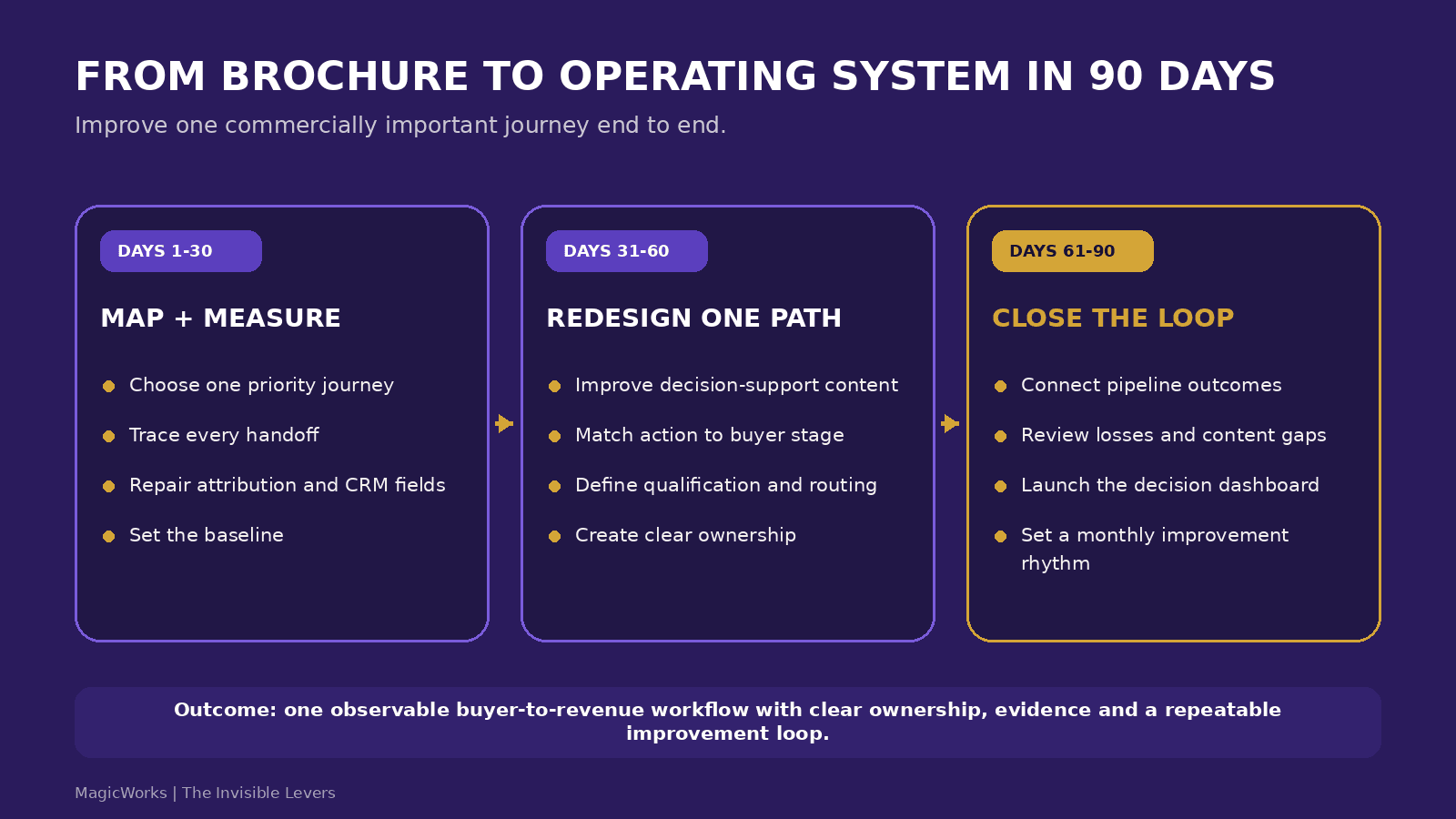
Days 1-30: map the revenue journey and repair measurement
Choose one priority service, product or location. Bring marketing, sales, operations and the website owner into the same working session. Map:
- the acquisition sources;
- the buyer's major questions;
- the pages and proof used;
- the conversion actions;
- the fields captured;
- the qualification decision;
- the destination system;
- the owner and response standard;
- the pipeline stages; and
- the final outcomes and loss reasons.
Then validate the plumbing. Test UTM persistence, form delivery, phone and email links, analytics events, consent records, CRM field mapping, duplicate handling and owner assignment. Use test leads with clearly marked dummy data and remove them after validation.
The deliverable for this phase is not a mock-up. It is a current-state journey map, measurement baseline and prioritised list of broken handoffs.
Days 31-60: redesign the highest-value path
Improve one path completely instead of making small changes everywhere. Rewrite the landing and service content around buyer decisions. Add relevant proof and scope boundaries. Simplify or expand the conversion step based on what sales genuinely needs. Separate non-sales paths. Create qualification rules, CRM fields, ownership and response standards.
At this stage, resist the temptation to automate every task. A manual but explicit handoff is better than an automated process nobody trusts. Document the operating rule first. Automate once the rule survives real cases.
The deliverable is a working priority journey from source to owned CRM record, with a clear buyer acknowledgement and measurable service level.
Days 61-90: connect outcomes and establish the improvement rhythm
Add the downstream fields needed to evaluate lead quality, opportunity progression, revenue and loss reasons. Create a dashboard that combines acquisition, website and CRM outcomes at a decision-making level. It need not contain every metric. It should answer:
- Which sources and pages create qualified opportunities?
- Where do good-fit visitors abandon or stall?
- Which enquiries miss the response standard?
- Which objections or missing answers appear repeatedly?
- Which segments create revenue efficiently?
- What will we change next, and how will we evaluate it?
Run the first monthly operating review. Give each agreed improvement an owner, hypothesis, success measure and review date. The website becomes a system when this loop continues after launch.
What technology does the system require?
There is no single mandatory stack. The right choice depends on complexity, scale, internal capability, integration needs, governance and the work the website must perform.
A straightforward services business may operate effectively with a well-structured WordPress site, reliable forms, analytics, consent management and a CRM integration. A business with complex personalisation, document processing, member workflows, intelligent search or high-performance requirements may benefit from a modern application stack such as Next.js, a headless CMS and server-side services. MagicWorks calls the latter an AI-native website when intelligence is built into the site's actual functioning, such as reading, evaluating, matching, organising or processing work. A chatbot alone does not make a site AI-native, and AI is not required for a website to operate as a sales system.
Choose technology after defining the workflow. Evaluate whether the stack can:
- render fast, accessible pages across devices;
- produce crawlable, indexable content;
- support structured content and clean URLs;
- preserve source and consent data;
- integrate securely with CRM and other systems;
- handle failures and retries without losing enquiries;
- expose meaningful analytics events;
- support role-based access and data retention rules;
- evolve without a complete rebuild for every new capability; and
- be maintained by the organisation or its accountable partner.
The architecture should fit the operating responsibility. A technically impressive stack with unclear ownership becomes another disconnected asset.
Where AI belongs, and where it does not
AI can strengthen selected layers of the system:
- conversationally understand a visitor's requirement;
- search a complex knowledge base using natural language;
- extract structured fields from an uploaded brief or RFQ;
- recommend lead priority with reasons and confidence;
- personalise content within defined rules;
- draft a response for human review;
- identify repeated content gaps in conversations; or
- summarise interaction history for a salesperson.
It should not be used merely to make the site appear modern. Before adding AI, define the recurring decision or processing task, the evidence available, the acceptable error, the human authority, the privacy boundary and the business metric. If a fixed rule or clearer form solves the problem, use it.
AI also increases the importance of the underlying system. An assistant cannot give a reliable service answer if the knowledge base is outdated. It cannot route a lead correctly if the service taxonomy is inconsistent. It cannot personalise responsibly if consent and identity are unclear. Intelligence amplifies the quality of the operating design it receives.
SEO, AEO and GEO are system functions, not publishing labels
Search visibility is often treated as a traffic project that ends when a visitor lands. A sales operating system connects discoverability to satisfaction and outcome.
For conventional search, this includes crawlable pages, clean information architecture, descriptive titles, internal links, fast delivery, useful content and clear entity information. For answer and generative search experiences, it also means publishing specific, attributable expertise that can be retrieved and supported by evidence.
The practical requirements overlap:
- define the question each page answers;
- provide a direct answer before deeper explanation where appropriate;
- use descriptive headings that reflect real buyer questions;
- support important claims with first-party or authoritative sources;
- distinguish research findings from interpretation and illustrative examples;
- connect the author to a credible profile and relevant experience;
- use original diagrams and images with descriptive filenames and alt text;
- link related pages so entities, services and evidence form a coherent topic cluster;
- keep essential content in crawlable HTML; and
- measure whether organic and AI-discovery visits create meaningful engagement and qualified demand.
This article follows that model. It offers a clear definition, an original seven-layer framework, an audit, a 90-day implementation path, cited evidence, visible FAQs and author attribution. Those elements are useful to people first. Their machine readability is a consequence of clarity, not a substitute for it.
For publication, use BlogPosting or Article structured data with accurate author, dates, headline, image and publisher information. Keep the structured data consistent with what is visible on the page. Do not add FAQPage markup expecting a Google FAQ rich result: Google
stopped showing that feature in May 2026 and removed its documentation in June 2026. The FAQs still belong on the page because they answer real questions and provide useful passage-level content.
The operating principle
The visible pages get the attention. The less-visible system decides whether that attention becomes revenue.
When commissioning a new website or reviewing an existing one, do not begin with colour, animation or the number of pages. Begin by tracing the journey:
Where did the visitor come from? What are they trying to decide? What should they see next? What information must be captured? Who owns the response? What happens after the handoff? Which outcome returns to improve the system?
If the project can answer those questions, design and technology have a commercial job to perform. If it cannot, a beautiful launch may still leave the business operating through inboxes, spreadsheets and memory.
The rule: Treat every page, form, integration and metric as part of one buyer-to-revenue workflow. If a component cannot name the decision or handoff it improves, it is probably decoration.
Ready to Make Your Website Work Like a Revenue System?
MagicWorks combines web development and digital marketing to connect acquisition, content, conversion, CRM and measurement around one accountable business journey. Our web-development practice builds fast, conversion-focused and AI-native websites where the use case justifies them. Our digital-marketing practice brings the traffic, content, SEO/AEO, campaign measurement and optimisation discipline needed to keep the system improving.
Explore Web Development,
book a discovery call. In thirty minutes, we will help identify whether your highest-value opportunity is a rebuild, a targeted conversion repair, better CRM integration, improved measurement or a simpler operating change.